
Most construction projects don't fall behind because of the design. They fall behind because the drawings can't keep up.
Bid windows close before takeoffs are finished. Field crews stop work waiting on a clarification. A permit gets bounced because a detail was missing. Meanwhile, your in-house drafter is buried across three jobs at once, and hiring a new one means weeks of recruiting before they ever open AutoCAD.
2D drafting is the documentation layer the entire job runs on. When it's clean, the trades execute. When it's messy, the project bleeds. Through RFIs, rework, missed milestones, and rejected submittals.
AEdigo gives general contractors, subcontractors, design firms, and fabricators on-demand access to pre-vetted 2D drafting professionals. They are fluent in AutoCAD, Revit 2D documentation, Civil 3D, Tekla 2D, and the layer and titleblock standards that come with each. They work inside a managed delivery system that tracks the work, and replaces anyone who isn't producing. You direct the output. We handle the workflow.
What 2D drafting services actually deliver
Typical outputs from a 2D drafting professional working through AEdigo:
Shop drawings for fabrication, installation, and consultant approval
Plans, sections, elevations, and detail sheets at any drawing scale
Permit and authority submission packages
Tender drawings and BOQ-supporting documentation
Redline updates and revision tracking against IFC sets
As-built drawings for project closeout and handover
Fabrication, assembly, and installation details
Coordination drawings between architectural, structural, and MEP scopes
CAD standard cleanup, layer reconciliation, and titleblock work
When you actually need 2D drafting support
The decision to bring in outside drafting capacity usually shows up as one of these moments. If any of these match where you are right now, drafting support solves a real problem, not a hypothetical one.
You just won a bid and the production drawings have to be ready in four weeks.
Your in-house drafter is overloaded across multiple projects and deadlines are slipping.
You're a subcontractor preparing shop drawings against a GC who keeps issuing redlines.
A permit submission was rejected and you need a clean, compliant package fast.
Bid season is hitting and your estimating team needs takeoff-ready drawings now.
You're closing out a project and the as-builts have not been started.
A consultant or in-house team member left mid-project and the documentation pipeline broke.
You're scaling into a new market and need drafting support that follows local standards.
How AEdigo runs 2D drafting work
There's a difference between handing a freelancer a stack of PDFs and running drafting work through a managed system. The first one ends in revision loops and missed deadlines. The second one delivers production-ready drawings on a predictable cadence.
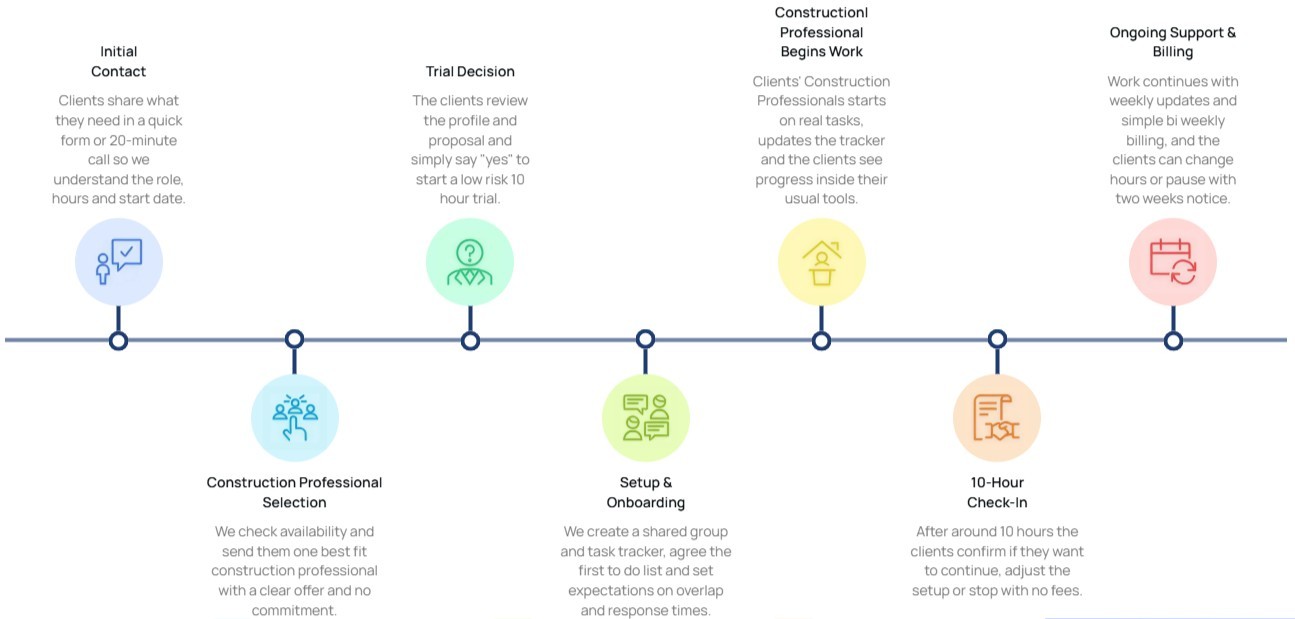
Here's how an AEdigo drafting engagement works in practice.
1. Match against scope
We match you with a drafting professional whose project history fits your scope, whether residential, commercial, industrial, infrastructure, or fabrication. You see the profile before they start.
2. Kick-off call to align on standards
Templates, layer standards, file naming, drawing numbering, communication cadence, and review process. Twenty minutes of alignment up front prevents weeks of rework later.
3. Daily or weekly cadence on your call
Some clients want a daily drawing log. Others want weekly batched deliverables. The drafting professional adapts to your team's rhythm, not the other way around.
4. Progress report
AEdigo issues progress reports covering drawings completed, hours logged, open items, blockers, and what's planned for the next week.
5. Replacement guarantee
If the drafting professional isn't the right fit, whether wrong skill depth, communication mismatch, or output quality below your standard, we replace them. You don't carry the risk of a bad hire.
Tools 2D drafting professionals work in
AEdigo's drafting professionals are vetted on the software environments construction teams actually run, not academic toolkits. They work inside your standards and your file structure.
AutoCAD for primary 2D drafting, shop drawings, detailing, and construction documentation
Revit (2D documentation) for extracting and producing coordinated drawings from BIM models
Civil 3D for site plans, grading, and infrastructure layouts
MicroStation for infrastructure and large-scale projects
Tekla Structures (drawing module) for steel shop drawings and fabrication detailing
SolidWorks (2D drawings) for manufacturing and fabrication documentation
BricsCAD and DraftSight for DWG-compatible drafting workflows
SketchUp Layout for 2D drawing sets and presentation documentation
What separates a good drafter from a CAD operator
Anyone can push lines around AutoCAD. The professionals who actually move projects forward bring construction context. They know why a drawing is being produced, who reads it next, and what mistake will cost the most rework.
When AEdigo vets a 2D drafting professional, this is what gets tested:
Real proficiency in AutoCAD and CAD drafting standards
Ability to read and interpret architectural, structural, and MEP construction drawings
Practical understanding of shop drawings, IFC sets, and permit drawing requirements
Discipline on dimensions, annotations, layers, and titleblock standards
Familiarity with international drafting standards
Ability to interpret design intent from incomplete or marked-up source documents
Clean revision discipline and version tracking habits
Communication skills strong enough to handle redlines without a translator
Use cases by stakeholder
Drafting support looks different depending on which side of the project you're on. The output, the standards, and the tolerances change. Here's how AEdigo's drafting professionals plug into each.
General contractors
Shop drawing review and coordination across trades
Redline updates from field conditions
As-built production for closeout
Bid-phase takeoff drawings
Submittal packaging for consultant approval
Subcontractors (MEP, steel, façade, fit-out)
Shop drawings and fabrication-level detail
Installation and assembly drawings
Coordination with the GC's drawings and other trades
Submittal drawings for consultant or client sign-off
Architecture and engineering firms
Design development and concept-to-IFC progression
Permit drawings and authority submission packages
Detail sheets and section coordination
Markup implementation and revision rounds
CAD standard maintenance across project teams
Suppliers and fabricators
Fabrication shop drawings
Installation and assembly details
Coordination drawings with site contractors
Custom detailing per spec sheet or project requirement
2D drafting support vs. the alternatives
Buyers usually compare AEdigo against three alternatives: hiring a full-time drafter, using a freelancer, or leaving the gap and hoping the in-house team absorbs it.
Hiring full-time means six to twelve weeks to recruit, onboard, and ramp, plus salary, benefits, software licensing, and the long-term overhead. It works if drafting load is constant. It doesn't work if it spikes with bid season or specific projects.
Using a freelancer cuts the hiring time but trades it for risk. No vetting layer, no replacement guarantee, no progress reporting, no continuity if they disappear mid-project. Your project manager becomes the freelancer's project manager.
Leaving the gap is the most expensive option. Missed bids, slipped milestones, rejected submittals, overloaded team members quitting, none of which show up on a budget line, all of which show up in margin.
AEdigo sits between full-time hire and freelance. You get vetted professionals with replacement coverage and weekly reporting, on-demand and adjustable, without the hiring overhead. When the project closes out, you cancel.
How engagement works
The terms are designed for how construction work actually moves: uneven loads, shifting timelines, project-by-project capacity needs.
10-hour free trial, no card required, no commitment
Flexible billing tied to actual hours worked
Cancel or pause with two weeks' notice
Adjust hours up or down as workload changes
Self-managed and managed tiers available
Frequently asked questions
Implementation note: Wrap this section in FAQPage schema markup (schema.org/FAQPage) to qualify for rich results in Google.
What CAD standards do AEdigo's drafting professionals work in?
They work inside your standards. The kick-off call locks the layer conventions, dimensioning standards, titleblock format, and submission requirements before any production work starts. Whether your office runs a custom CAD standard, an authority submission template, or a client-mandated layer naming protocol, the drafter adapts to it.
Can we work with the drafter directly, or does AEdigo manage them?
Both options exist. The self-managed tier gives you direct access. You brief and direct the drafting professional yourself, and AEdigo handles only the vetting and contract layer. The managed tier means AEdigo runs the task tracker, weekly reporting, and replacement coverage. Most clients start managed and shift to self-managed once they're confident in the fit.
What if the drafting professional we get isn't the right fit?
Replacement is built into the engagement. If the skill depth, output quality, or communication isn't right, we replace them. You don't carry the cost of a bad hire.
Can your drafters handle redline updates from field conditions?
Yes. Redline implementation is one of the most common scope items. The drafter pulls markups from your field team, updates the drawing set against current site conditions, and tracks the revision history so the as-built record stays clean.
Do AEdigo's drafters work in software beyond AutoCAD?
Yes. The professional pool covers Revit (2D documentation), Civil 3D, MicroStation, Tekla 2D, SolidWorks 2D, BricsCAD, DraftSight, and SketchUp Layout. The match process accounts for software fluency before placement, so generalists don't get placed on specialized work.