
BIM only earns its cost on a project when the model is actually used to build the work. Most teams don't get there. The model gets built, sits in a viewer, and the field still runs off 2D PDFs and field markups, because the model isn't accurate enough, isn't coordinated, or isn't being maintained.
That's not a software problem. It's a modeling capacity problem.
When the BIM/VDC team is understaffed, models lag behind design changes, clash reports pile up unresolved, and shop drawings fall back on tribal knowledge. Rework climbs. Coordination meetings turn into status updates instead of decisions.
AEdigo gives general contractors, subcontractors, and design firms direct access to pre-vetted 3D BIM modelers who build coordinated, construction-ready Revit models, and stay engaged through the project's lifecycle, not just the model setup. They work inside your standards, on your file structure, with progress reporting and replacement coverage if the fit isn't right.
What 3D VDC/BIM modeling services actually deliver
BIM modeling is broader than building a Revit file. The deliverables that move projects forward are the ones the team uses every day: for coordination, fabrication, takeoffs, and field execution.
Typical outputs from a 3D BIM modeler working through AEdigo:
Architectural, structural, and MEP Revit models built to project LOD requirements
Coordinated federated models across trades
Clash detection runs and resolution tracking in Navisworks or Revizto
Shop drawing extraction from coordinated models
As-built model updates from RFI logs and field markups
Quantity takeoff data extracted directly from the model
4D scheduling links between Revit models and the project schedule
Custom Revit families built to your specifications
Model maintenance through design changes and IFC revisions
When you actually need 3D VDC/BIM modeling support
Bringing in dedicated BIM modeling capacity usually solves one of these problems. If you're inside one of these scenarios, the cost of doing nothing is already showing up in the project. You just may not have priced it yet.
You just won a project that contractually requires BIM deliverables and you don't have the in-house capacity.
Your VDC team is buried across three or four active projects and the model on the newest one is already behind.
You're seeing field rework that traces back to coordination gaps the model should have caught.
Shop drawing production is bottlenecked because the underlying model isn't coordinated.
A subcontractor's model is coming in incomplete and someone has to fix it before federation.
Your firm is moving from 2D-led to BIM-led project delivery and you need ramp capacity without committing to permanent headcount.
You're chasing a bid that requires LOD 350 or 400 deliverables and you don't have the bandwidth in-house.
How AEdigo runs VDC/BIM modeling work
BIM modeling done badly costs more than no BIM at all. Bad models create false confidence and hide problems until they hit the field. AEdigo runs BIM work inside a managed delivery layer designed to prevent that.
1. Match against scope and LOD
Architectural-only modelers don't get placed on MEP coordination scopes. Modelers without structural background don't get matched to steel-heavy projects. The match accounts for LOD requirements, software stack, and project type.
2. Kick-off on standards and templates
Revit template, family library, naming conventions, view standards, sheet structure, and federation rules. The modeler aligns to your environment before any production work begins.
3. Coordination cadence
Whether you run weekly Navisworks pulls, daily clash reports, or async coordination through Revizto, the modeler integrates into that rhythm. Yours doesn't bend to theirs.
4. Progress reporting
AEdigo issues progress reports covering modeled scope completed, clash resolution status, open items, and the next week's plan.
5. Replacement coverage
If the modeler isn't producing at the right level, whether depth, speed, or coordination discipline, we replace them. The risk of a wrong fit doesn't sit on you.
Tools VDC/BIM modelers work in
AEdigo's modelers are vetted on the actual production software construction firms run, not academic environments.
Autodesk Revit for architectural, structural, and MEP modeling
Navisworks Manage for clash detection and federation
Revizto for issue tracking and coordination
AutoCAD for 2D extracts and drawing production
Dynamo for Revit automation and parametric workflows
Civil 3D for site and infrastructure modeling
Tekla Structures for steel detailing and modeling
BIM 360 / Autodesk Construction Cloud for model collaboration
Rhino plus Grasshopper for projects with complex geometry
What separates a good BIM modeler from a Revit user
Knowing Revit doesn't make someone a BIM modeler. Knowing why a model is being built, what it has to support downstream, and how it federates with other trades. That's the line.
AEdigo vets BIM modeling professionals on:
Practical Revit fluency across modeling, families, schedules, and views
Understanding of LOD progression and what each level actually means in construction
Coordination experience across architectural, structural, and MEP scopes
Discipline on naming, worksets, and model health management
Ability to read construction drawings and resolve ambiguity in source documents
Clash resolution judgment, knowing which clashes matter and which ones don't
Familiarity with project-specific BIM execution plans
Communication discipline strong enough to drive coordination meetings
Use cases by stakeholder
BIM modeling means different things to different parts of the project team. AEdigo modelers work across the full range.
General contractors
Federated coordination model maintenance
Clash detection and resolution coordination
Shop drawing review against the federated model
Quantity verification from the model
As-built model production from field changes
Subcontractors
Trade-specific Revit models (mechanical, electrical, plumbing, structural steel, façade)
Shop drawing extraction from the model
Coordination model sharing with the GC and other trades
Fabrication-ready model output (LOD 400)
Architecture and engineering firms
Design development modeling
Construction document drawing production from the model
Model coordination with engineering consultants
Visualization output for client presentations
Model maintenance through design revisions
3D BIM modeling vs. the alternatives
The realistic alternatives to AEdigo modeling support are: hiring full-time, using a generalist freelancer, or running short-staffed and absorbing the rework.
Full-time BIM hires take eight to fourteen weeks to recruit and ramp, and longer in specialized scopes. The fixed cost runs against fluctuating BIM workloads, which means you either over-staff or under-deliver.
Freelance BIM modelers can move faster on price, but the quality range is wide and the accountability layer is missing. When a freelance modeler disappears mid-project, the federated model sits frozen.
Running short-staffed sounds like the cheap option until you total the cost of unresolved clashes, missed coordination opportunities, and shop drawings the field can't trust.
AEdigo's position is different by design: vetted modelers, managed delivery, progress reporting, replacement coverage, and pricing aligned to project workload, not permanent headcount.
How engagement works
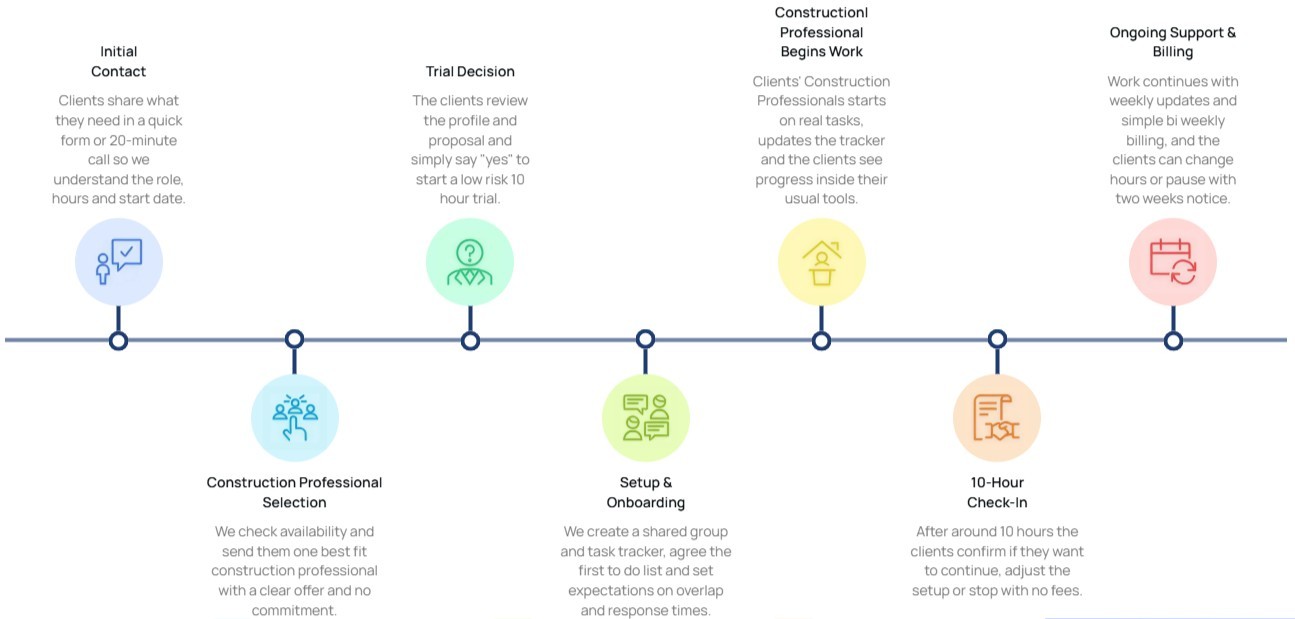
10-hour free trial, no card required, no long-term commitment
Flexible billing tied to actual hours worked
Cancel or pause with two weeks' notice
Capacity adjusts as project workload moves
Self-managed and managed tiers available
Frequently asked questions
Implementation note: Wrap this section in FAQPage schema markup (schema.org/FAQPage) to qualify for rich results in Google.
What LOD levels do AEdigo's BIM modelers work to?
From LOD 100 conceptual through LOD 400 fabrication-ready, depending on project requirements. The match process accounts for LOD before placement. Modelers without LOD 350+ experience aren't placed on fabrication-driven scopes.
Can AEdigo's modelers run clash detection and coordination meetings?
Yes. Clash detection in Navisworks or Revizto, issue tracking, and participation in coordination meetings are common scope items. Some clients have AEdigo modelers run the BIM coordination role end-to-end on smaller projects.
Do AEdigo's modelers work inside our Revit template and family library?
That's the default. The kick-off call covers your template, families, worksets, view standards, and naming conventions. The modeler adapts to your environment, not the other way around.
How do you handle BIM execution plan compliance?
If the project has a BIM Execution Plan, the modeler reviews it before production work starts, and the kick-off call locks alignment to it. AEdigo can also help draft a BEP if the project doesn't have one yet.
What if our project needs MEP-specific modeling depth?
MEP modelers are vetted and matched separately from architectural or structural modelers. The match process uses your scope to filter, so generalists don't get placed on specialized work.