
Every clash you find before mobilization is rework you don't pay for in the field. Every clash you miss becomes a change order, a delay, or both.
The math is straightforward, but most projects still ship to construction with hundreds of unresolved clashes. Not because the team doesn't know they're there, but because nobody has the bandwidth to run the detection cycles, sort the noise from the real conflicts, and drive resolution across trades.
Clash detection isn't a one-time pass. On an active project, it's a weekly or biweekly cycle that runs from preconstruction through closeout. Doing it right takes someone fluent in Navisworks or Revizto, with the construction context to know which clashes matter and which ones are noise.
AEdigo gives general contractors, subcontractors, and design firms on-demand access to pre-vetted clash detection professionals who run the cycles, sort the issues, and stay engaged with the coordination process, not just the software output.
What clash detection services actually deliver
A clash report list isn't the deliverable. The deliverable is fewer clashes that survive into the field. That requires more than software. It requires judgment.
Typical outputs from a clash detection professional working through AEdigo:
Federated model assembly across architectural, structural, and MEP
Weekly or biweekly clash detection runs in Navisworks or Revizto
Filtered clash reports with real conflicts separated from soft clashes and false positives
Issue tracking with assigned trade ownership and resolution status
Clash resolution coordination across trade modelers
Coordination meeting preparation and minutes
Pre-construction sign-off reports with clash density metrics
Closeout coordination archive for as-built model verification
When you actually need clash detection support
Bringing in dedicated clash detection capacity solves a problem most projects don't price until it's too late. These are the buy-trigger moments.
You have federated models from multiple trades but nobody is running the clash cycles consistently.
Coordination meetings have turned into status reports instead of decisions because the clash list is unmanaged.
Your VDC lead is being pulled into modeling work and clash detection is slipping.
Field crews are reporting issues that should have been caught in coordination.
A subcontractor delivered models late and you need a rapid coordination cycle before mobilization.
Your clash report has more than 500 open items and nobody has time to sort it.
You're entering the construction phase and need a final clean coordination pass.
How AEdigo runs clash detection work
1. Federated model assembly
The clash detection professional pulls trade models (architectural, structural, MEP, fire protection, façade) and assembles a federated coordination model in Navisworks or Revizto, working inside your folder structure and naming standards.
2. Detection cycles on a fixed cadence
Cycle frequency depends on project phase. Detection runs are scheduled weekly during active coordination, biweekly during stable phases, and on-demand around major model updates.
3. Filtering and prioritization
Raw clash counts mean nothing without filtering. Soft clashes, duplicate clashes, model-error clashes, and tolerance-driven clashes get separated from real coordination issues. The output is a report of conflicts that actually need action.
4. Resolution coordination
Each filtered clash gets assigned a trade owner and tracked through resolution. The clash detection professional drives the loop until the conflict is closed in the model.
5. Progress coordination report
Clash count trend, resolution rate by trade, open critical items, and next-week plan, issued every week so the project team has live coordination visibility, not a quarterly snapshot.
Tools clash detection professionals work in
Navisworks Manage for primary clash detection and federation
Revizto for coordination, issue tracking, and multi-stakeholder review
BIM Collaborate Pro / BIM 360 for model collaboration and coordination
Revit for trade model interrogation and model fixes
Solibri for model checking and rule-based validation
Dynamo for clash report automation and reporting workflows
What separates a clash detection professional from a Navisworks operator
Anyone can press Run Test in Navisworks and produce a 2,000-clash report. The professional who actually moves a project forward filters that down to the 80 that matter, gets them owned and tracked, and prevents the same clash from re-appearing in the next cycle.
AEdigo vets clash detection professionals on:
Navisworks or Revizto fluency at production level
Construction context strong enough to triage real vs. noise clashes
Discipline on clash filtering, grouping, and rule setup
Coordination meeting facilitation skills
Ability to read multi-trade models and identify root-cause patterns
Tracking discipline through resolution, not just identification
Clear written reporting fit for project leadership consumption
Use cases by stakeholder
General contractors
Multi-trade federation and weekly coordination cycles
Subcontractor model intake and review
Coordination meeting preparation and minutes
Pre-construction sign-off coordination reports
Subcontractors
Trade-internal clash detection before model issue
Clash resolution against GC-issued coordination models
Fabrication readiness coordination passes
Engineering and design firms
Design-phase coordination across structural and MEP
Discipline coordination before IFC issue
Authority submission coordination packs
Common clash detection mistakes that waste project time
Most clash detection programs fail in predictable ways. If your current cycles look like any of these, the issue isn't the software. It's the workflow.
Running clash tests with default tolerance settings, which produces a flood of false positives nobody filters.
Treating every clash as equal weight, instead of separating critical conflicts from soft clashes and tolerance-driven flags.
Producing reports without trade ownership, which means clashes get identified but not assigned.
Not re-running detection after a model update, so closed clashes silently reopen.
Skipping clash grouping, which buries the same root-cause problem as fifty separate items.
Treating clash detection as a pre-construction one-off instead of a recurring cycle through the project.
What changes when the workflow is right
A coordinated project tracks clash counts the same way it tracks RFIs and submittals: as a leading indicator of construction risk. Clash density per 1,000 cubic meters trends down week over week. Resolution velocity stays predictable. Open critical items don't age past defined thresholds. The coordination meeting becomes a 30-minute decision room instead of a two-hour status update.
That doesn't happen because of better software. It happens because someone owns the cycle and runs it on cadence.
Clash detection services vs. the alternatives
The alternatives are familiar: have your in-house VDC lead do it on top of their other work, contract a clash report from a freelancer with no coordination follow-through, or skip the cycle and absorb the rework downstream.
Loading clash detection onto an existing VDC role usually means it gets done badly or late. Coordination work and modeling work compete for the same calendar, and modeling almost always wins.
Outsourcing the clash report itself, but not the resolution, produces a PDF that nobody acts on. The list grows. Field rework climbs.
Skipping the cycle is the most expensive option. Coordination clashes that survive to the field show up as RFIs, change orders, and schedule slips, with margin loss attached to each.
AEdigo runs detection and resolution as one connected service, with weekly reporting and a single coordinator accountable for closing the loop.
How engagement works
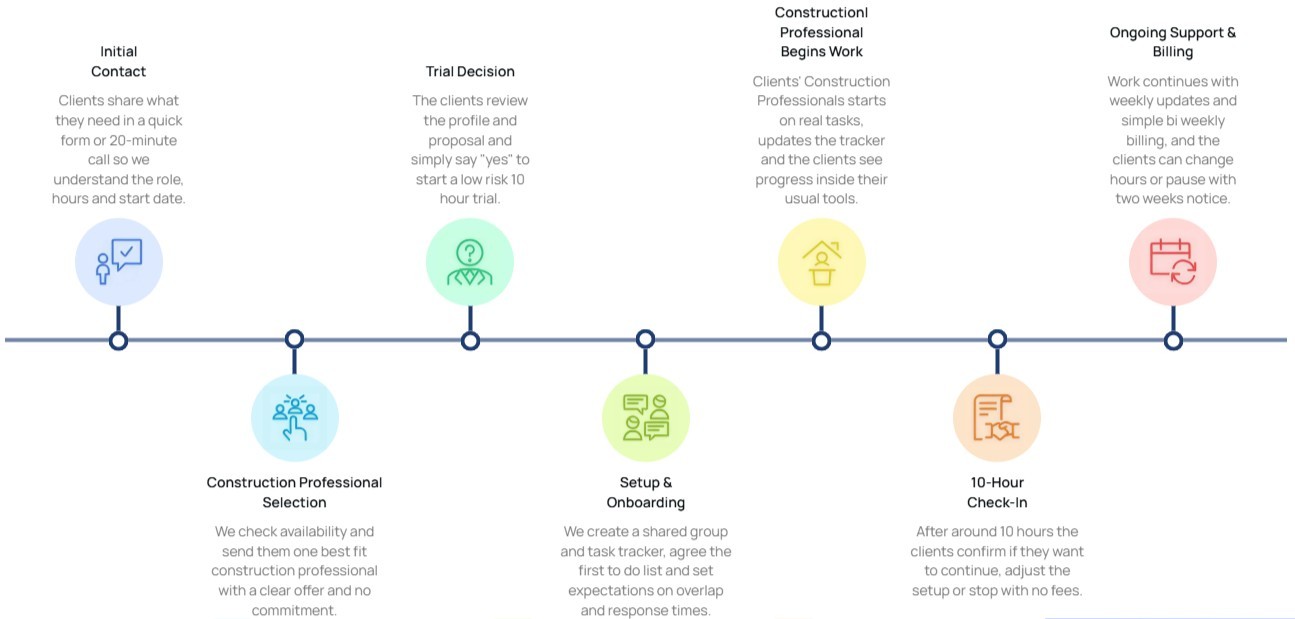
10-hour free trial
Flexible billing tied to actual hours worked
Cancel or pause with two weeks' notice
Capacity scales with project phase
Self-managed and managed tiers available
Frequently asked questions
Implementation note: Wrap this section in FAQPage schema markup (schema.org/FAQPage) to qualify for rich results in Google.
How often should clash detection cycles run?
It depends on project phase. During active coordination, weekly cycles are standard. During stable design phases, biweekly works. After major model updates from any trade, an on-demand cycle is the right call. AEdigo sets the cadence with you during kick-off.
Do AEdigo's clash detection professionals only run reports, or do they coordinate resolution too?
Both. Most clients hire AEdigo to run the full cycle, including detection, filtering, assignment, tracking, and resolution coordination. Detection without resolution is a deliverable that doesn't move projects.
Can clash detection run on partial models or before all trades have submitted?
Yes. Phased coordination passes are standard practice. We run detection on whichever trades are available, flag dependencies, and re-run when the missing scopes come in.
What clash detection software do AEdigo's professionals work in?
Primarily Navisworks Manage and Revizto. Solibri and BIM Collaborate Pro come up on specific projects. The match process accounts for software fluency before placement.