
Schedules drift the moment they leave the planning phase. Field reality moves faster than the schedule update cycle, dependencies change, weather hits, deliveries slip, and within a few weeks the baseline schedule is a historical artifact rather than a project management tool.
Most contractors know this. They also know that bringing the schedule back to current takes more time than their in-house schedulers have. The result is project leadership making decisions against a schedule that doesn't reflect reality.
AEdigo gives general contractors, subcontractors, owners, and project management firms on-demand access to pre-vetted schedulers fluent in Primavera P6 and Microsoft Project. They run weekly or biweekly schedule updates, status review, look-ahead production, and impact analysis, working inside your project's schedule baseline and contract structure.
What schedule tracking services actually deliver
Typical outputs from a schedule tracking professional working through AEdigo:
Weekly or biweekly schedule updates against the baseline
Progress measurement against earned-value or physical-percent metrics
Variance analysis against baseline and previous update
Look-ahead schedules (3-week, 6-week) tied to the master schedule
Critical path tracking with current path identification
Schedule narrative documenting status, variances, and recovery plans
Subcontractor schedule integration
Owner reporting packages aligned to contract requirements
When you actually need schedule tracking support
Your project schedule is out of date and project leadership is flying blind.
Weekly updates have been deferred and the gap is now multiple weeks.
Look-ahead schedules aren't being produced consistently.
Subcontractor schedule integration is informal and gaps are showing up.
An owner is asking for current schedule reports and the in-house team can't produce them in time.
Critical path tracking has fallen behind and project decisions are being made against stale data.
Multiple projects share one scheduler and the bandwidth is split too thin.
How AEdigo runs schedule tracking work
1. Match against software and project complexity
P6-fluent schedulers don't get matched to MS Project-only teams. The match accounts for software, project type, and contract structure.
2. Kick-off on schedule baseline and conventions
Baseline schedule, update cycle, progress measurement convention, look-ahead format, schedule narrative template, and contract reporting requirements. The kick-off locks the framework before the first update cycle begins.
3. Update cycle on a defined cadence
Weekly or biweekly cycles run on a fixed cadence. Status pulled from field, progress measured, schedule updated, variance analyzed, look-ahead produced, narrative drafted.
4. Internal review
Before update issuance, the cycle goes through self-review against the baseline, the previous update, and any contract-specific reporting requirements. Variances get traced to causes, not just flagged.
5. Progress and risk report
Schedule status, critical path movement, variance trends, look-ahead readiness, and emerging risk items. Project leadership sees the schedule as a current management tool, not a historical record.
Tools schedule tracking professionals work in
Primavera P6 for primary schedule updates and analysis
Microsoft Project for MS Project-led teams
Procore Schedule for projects running Procore as the schedule platform
Asta Powerproject for projects on the Asta platform
Excel for look-ahead production and reporting integration
Schedule baseline tools and earned-value reporting integrations
What separates a schedule tracker from a P6 operator
Anyone can mark progress in P6. The professional who delivers a schedule project leadership can act on knows where to dig for status, what variance signals matter, and how to translate field reality into schedule logic without breaking the network.
AEdigo vets schedule tracking professionals on:
Software fluency in P6 or MS Project at production level
Construction context across the project types they support
Variance analysis discipline
Look-ahead production habits
Schedule narrative writing skill
Subcontractor integration experience
Earned-value or physical-percent measurement discipline
Communication skills for status pull from field teams
Use cases by stakeholder
General contractors
Project schedule updates against baseline
Subcontractor schedule integration
Owner schedule reporting packages
Look-ahead production for field execution
Subcontractors
Trade-specific schedule tracking against GC schedules
Production schedule maintenance for self-perform work
Look-ahead schedules for field crews
Owners and program managers
Independent schedule tracking against contractor submissions
Multi-project portfolio schedule reporting
Schedule QC against contract requirements
Common schedule tracking failures
Schedule problems show up in predictable patterns. If your projects have hit any of these, the issue is cadence, not effort.
Update cycles deferred during field-busy weeks, creating compounding gaps.
Status pulled from secondary sources rather than verified field information.
Variance flagged without root-cause analysis, leaving project leadership without context.
Look-aheads produced inconsistently, breaking the link between master schedule and field execution.
Subcontractor schedule integration handled informally, hiding cross-trade dependencies.
Critical path lost during updates, creating decisions against incorrect priority.
Owner schedule reports produced reactively rather than as part of the standard cycle.
Schedule update cycles that actually inform decisions
A schedule update is only useful if project leadership can act on it. Most schedule update cycles fail this test, not because the data is wrong, but because the analysis layer between data and decision is missing.
What separates an update that informs decisions from one that just records progress:
Variance analysis traces every deviation to a root cause, not just to a deviation amount.
Critical path movement gets called out explicitly, with the new path identified.
Look-aheads tie back to the master schedule and flag dependency conflicts.
Recovery and mitigation actions get documented in the schedule narrative.
Subcontractor schedule integration confirms cross-trade dependencies are intact.
Earned-value or physical-percent tracking gives a leading indicator, not a lagging one.
Schedule tracking services vs. the alternatives
The alternatives are: load schedule work onto the project manager, contract to a freelance scheduler without project context, or accept that schedule updates will be inconsistent.
Project managers loaded with schedule work usually defer it during field-busy periods, creating aging gaps that compound into critical-path drift.
Freelance schedulers without project context produce updates that look complete but don't reflect field reality, undermining the schedule's usefulness as a management tool.
Inconsistent updates leave project leadership making decisions against stale data, with the cost showing up as missed milestones and disputed delays.
AEdigo runs schedule tracking as a managed engagement: vetted schedulers, your baseline, your update cycle, your contract reporting, with weekly progress and risk reports.
How engagement works
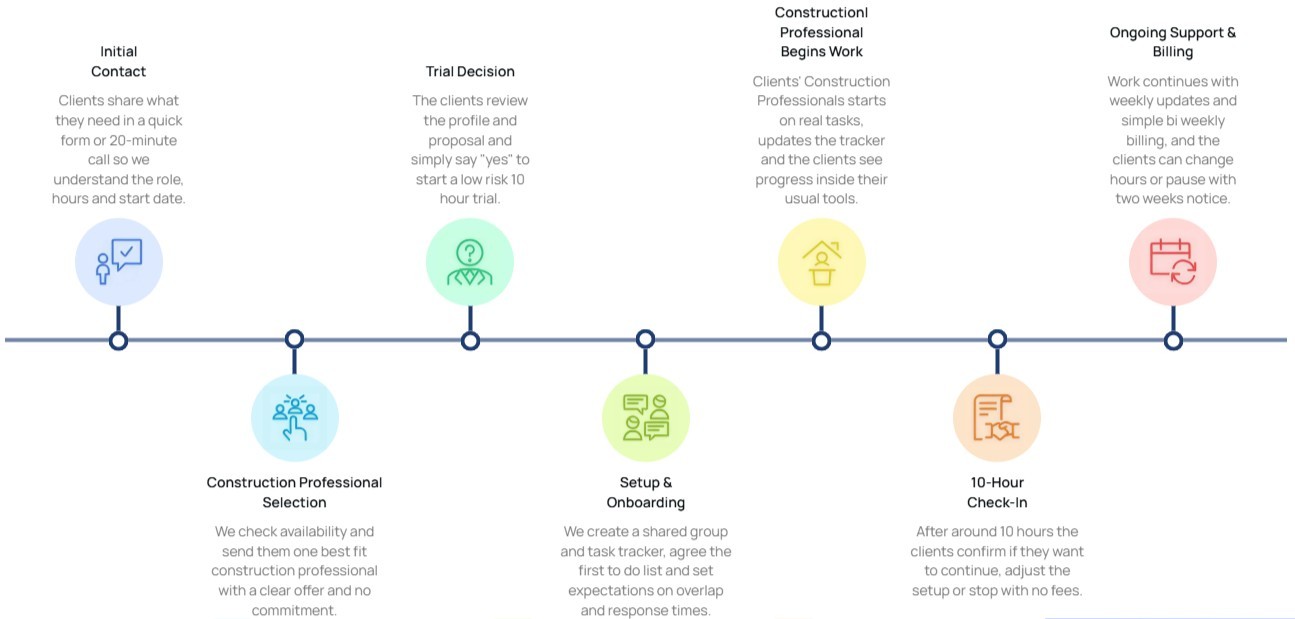
10-hour free trial
Flexible billing tied to actual hours worked
Cancel or pause with two weeks' notice
Capacity scales with project phase and schedule complexity
Self-managed and managed tiers available
Frequently asked questions
Implementation note: Wrap this section in FAQPage schema markup (schema.org/FAQPage) to qualify for rich results in Google.
Will the scheduler work in P6, MS Project, or our specific scheduling platform?
Yes. The match process accounts for software fluency before placement. P6, MS Project, Procore Schedule, and Asta Powerproject are all in the professional pool.
Can the scheduler integrate subcontractor schedules into the master?
Yes. Subcontractor schedule integration is part of standard scope. The scheduler pulls subcontractor schedules, integrates dependencies, and verifies cross-trade alignment with the master schedule.
Does schedule tracking include look-ahead production?
Yes. Look-ahead schedules including 2-week and 4-week formats are part of standard scope. Look-aheads tie to the master schedule and get produced on the cadence the field team needs.
Can the scheduler produce owner reporting packages?
Yes. Contract-specific owner reports including schedule narrative, variance analysis, critical path status, and milestone tracking are part of standard scope on engagements where the contract requires them.
How are variances and delays handled in the update cycle?
Variances get traced to root causes during the update cycle, not just flagged. The schedule narrative documents the variance, the cause, and any recovery or mitigation actions. This documentation supports both project management and any future delay analysis.